> ## Documentation Index
> Fetch the complete documentation index at: https://realsite.ca/docs/llms.txt
> Use this file to discover all available pages before exploring further.
# Area guides
> Neighbourhood pages in your voice, with live listings inside — they keep themselves fresh.
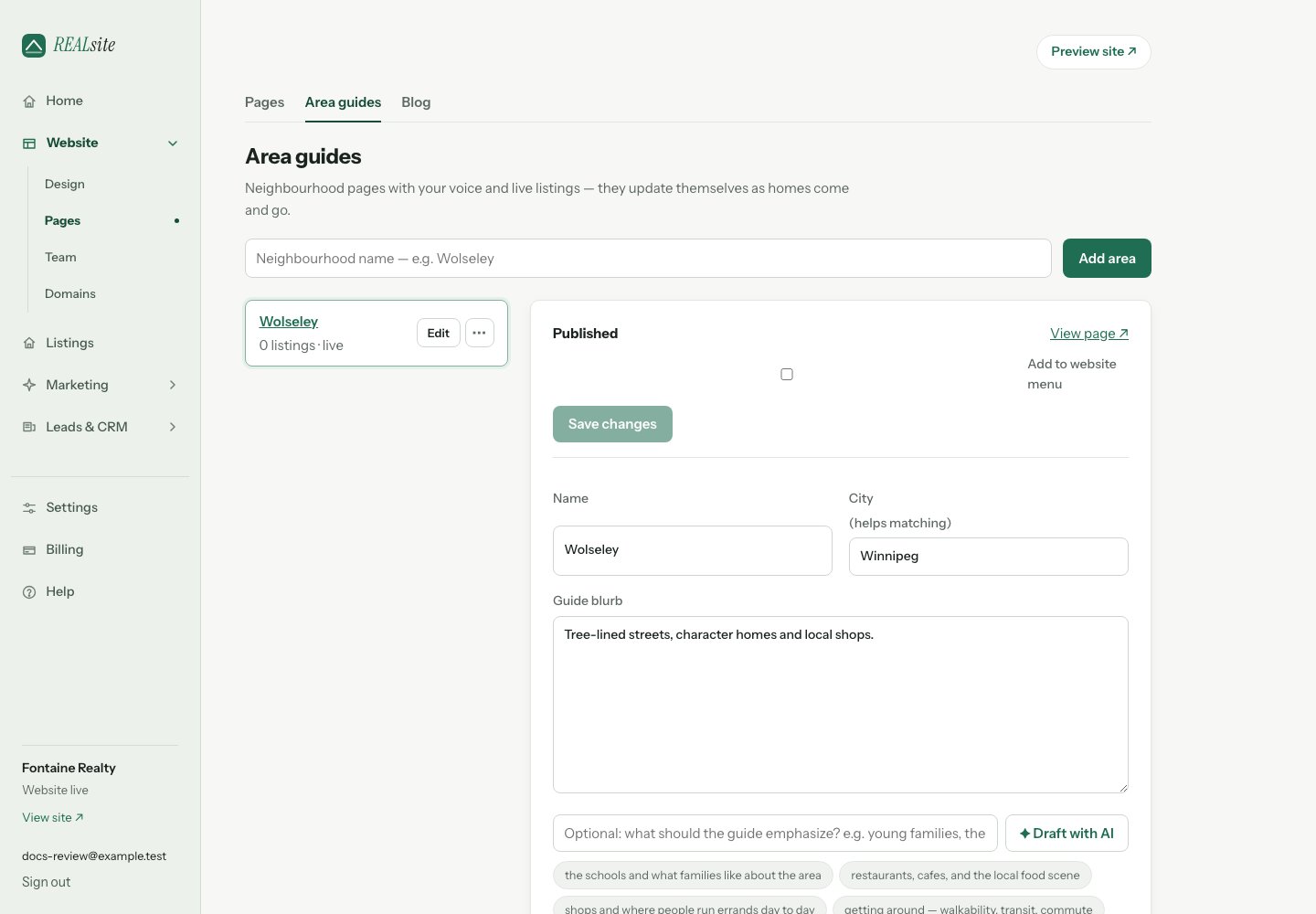 An area guide is a neighbourhood page: your take on Wolseley or River
Heights, with the live listings that match it embedded. As homes come and
go, the page updates itself — unlike the hand-written "hyperlocal" pages
that stale on most agent sites.
## Creating one
In **Website → Pages → Area guides**, name the area and write your blurb — what
you'd tell a buyer over coffee. **Publish guide** saves your current edits and
publishes in one step. Select **Add to website menu** to include a navigation
link at the same time, or use **Save draft** to keep working privately.
You can also add a published guide to the menu from this editor later.
If your website is still coming soon, the guide is saved for launch and the
editor links to your site visibility settings. The page lives at `/areas/its-name`, matching
active listings appear automatically, and it joins your sitemap.
## Draft with AI
Not sure where to start? **✦ Draft with AI** writes a first pass of the
blurb for you. Tell it what to emphasize — young families, the river trails
— or pick one of the suggested directions (schools, restaurants and cafes,
shops, getting around, parks) to fill the box for you. Either way, the draft
lands in the blurb field for you to read, edit, and make yours before you
publish.
## Around the area
Give an area a name and a city and REALsite places it on the map and
looks up what is actually nearby: schools, parks, groceries, places to
eat and ways to get around, each with how far it is from the centre of
the neighbourhood and its Google rating. The page shows them under
**Around Wolseley**, along with how many homes are for sale there and how
many you sold, and the facts refresh themselves every month. **Refresh
places** in the area's editor fetches them again right away. Save changes to
the area's name or city before refreshing. Untick
**Show nearby places** if you would rather the page kept to your words.
**Draft with AI** uses these nearby places for context. Check names, details
and local advice before publishing; an AI draft can still make mistakes.
## Why these pages matter
Useful local advice gives people a reason to visit and share your site.
Published guides can also help search engines and AI assistants understand
the areas you serve, though inclusion, rankings and citations are not guaranteed.
Area guides also feed your valuation forms: on themes with an area
selector, "I live in…" is powered by your published areas, and the lead
arrives tagged with the neighbourhood.
This documentation is built and hosted on [Mintlify](https://mintlify.com), a developer documentation platform.
An area guide is a neighbourhood page: your take on Wolseley or River
Heights, with the live listings that match it embedded. As homes come and
go, the page updates itself — unlike the hand-written "hyperlocal" pages
that stale on most agent sites.
## Creating one
In **Website → Pages → Area guides**, name the area and write your blurb — what
you'd tell a buyer over coffee. **Publish guide** saves your current edits and
publishes in one step. Select **Add to website menu** to include a navigation
link at the same time, or use **Save draft** to keep working privately.
You can also add a published guide to the menu from this editor later.
If your website is still coming soon, the guide is saved for launch and the
editor links to your site visibility settings. The page lives at `/areas/its-name`, matching
active listings appear automatically, and it joins your sitemap.
## Draft with AI
Not sure where to start? **✦ Draft with AI** writes a first pass of the
blurb for you. Tell it what to emphasize — young families, the river trails
— or pick one of the suggested directions (schools, restaurants and cafes,
shops, getting around, parks) to fill the box for you. Either way, the draft
lands in the blurb field for you to read, edit, and make yours before you
publish.
## Around the area
Give an area a name and a city and REALsite places it on the map and
looks up what is actually nearby: schools, parks, groceries, places to
eat and ways to get around, each with how far it is from the centre of
the neighbourhood and its Google rating. The page shows them under
**Around Wolseley**, along with how many homes are for sale there and how
many you sold, and the facts refresh themselves every month. **Refresh
places** in the area's editor fetches them again right away. Save changes to
the area's name or city before refreshing. Untick
**Show nearby places** if you would rather the page kept to your words.
**Draft with AI** uses these nearby places for context. Check names, details
and local advice before publishing; an AI draft can still make mistakes.
## Why these pages matter
Useful local advice gives people a reason to visit and share your site.
Published guides can also help search engines and AI assistants understand
the areas you serve, though inclusion, rankings and citations are not guaranteed.
Area guides also feed your valuation forms: on themes with an area
selector, "I live in…" is powered by your published areas, and the lead
arrives tagged with the neighbourhood.
This documentation is built and hosted on [Mintlify](https://mintlify.com), a developer documentation platform.