> ## Documentation Index
> Fetch the complete documentation index at: https://realsite.ca/docs/llms.txt
> Use this file to discover all available pages before exploring further.
# Getting started
> Make your site yours, choose a useful first task, and get ready to launch.
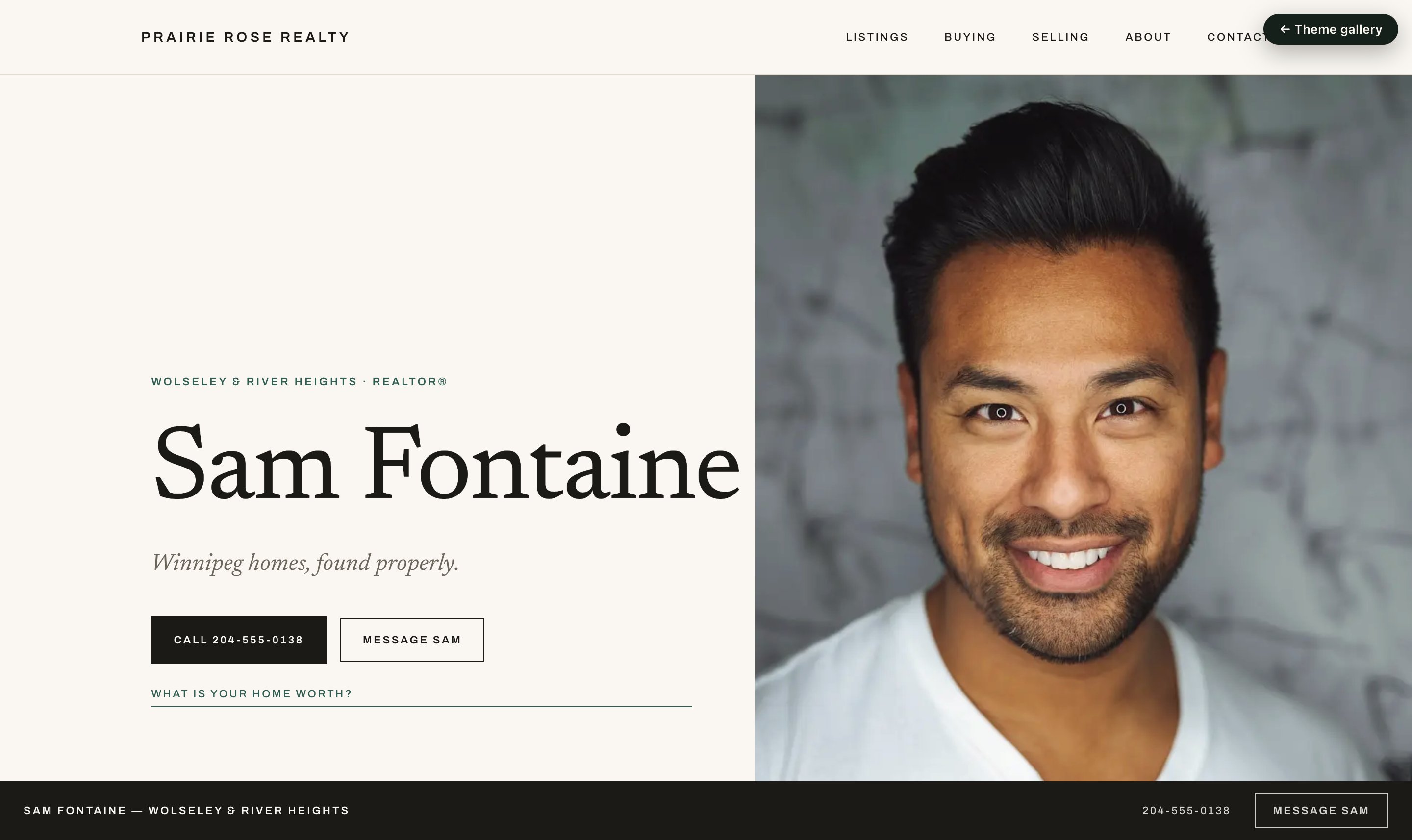 **REALsite** brings your website and marketing together: choose a look for your
agent website and matching social campaigns, presentations and printed materials.
Listings, property websites, newsletters, lead generation and CRM keep the work
connected, with every REALsite feature included. These docs cover how
to run it; [realsite.ca](https://realsite.ca) covers why.
Your site is born furnished. After signup, confirm the link sent to your email
(that is when your 14-day trial begins). Then a short start screen asks for
a few things you already know: your headshot, your brokerage, the year
you were licensed, an optional tagline, the city and neighbourhoods you
work, and a few past sales. Press
**Show me my site so far** and you have a working site: a homepage, Buying
and Selling pages (with a mortgage calculator and a home valuation form
already on them), an About page written in your voice, a contact page, area
guides for your neighbourhoods, your sales on the map, and a menu tying it
together. Nothing to assemble first. Skip the screen if you like; the site
is just as real, only emptier.
It ends on **Your site so far**, not on "done": a preview, links to every
page, and the next moves that make it yours. An optional **Make something you can use**
step offers a social post when you have a usable listing, or a seller presentation
when you do not. You can continue website setup instead. **Change these answers** takes
you back to the form. Moving from another website? The start screen links to
[Bring my site](/docs/help/move-my-site) first.
Visitors don't see it yet. A new site opens on a coming-soon page so you can
make it yours before anyone looks. Home puts **Preview my website** and
**Manage listings** first, followed by three steps: make it yours, connect
your listings, and **Review and go live**.
**Review and go live** takes you straight to the preview link and visibility
controls. Check your pages, choose **Live**, then save when you're ready.
Marketing-email setup is not needed to launch your website. When you prepare
a newsletter, REALsite prompts you for any missing sender details; completing
that setup also lets visitors subscribe through your coming-soon page.
## Choose a useful first task
Choose the task that fits what you have today. You can return to website setup
at any time; you do not need to try every tool first.
* **Have a seller conversation coming up?** Open **Marketing → Overview →
Prepare a seller presentation**. Start with the address and your proposed
approach, then save and preview the plan. No listing feed is needed; photos
can come later. [Prepare the presentation](/docs/help/walkthrough-marketing-studio#before-the-listing-appointment).
* **Have a listing to market?** Open **Listings → Social post** on that home.
Review the prepared image and caption, keep the design or customize it, and
save a post you can return to. Review the public destination before sharing
its link. [Make a social post](/docs/help/marketing-kits#the-social-post), or
[prepare a Reel and image sequence](/docs/help/walkthrough-marketing-studio#when-you-have-a-listing-to-share).
* **Want to check how enquiries become conversations?** Create a page under
**Marketing → Lead generation**, review its public visibility, then submit
a labelled test enquiry. Find it in **Leads & CRM → Leads**, record a note
and set a follow-up. [Try the full enquiry journey](/docs/help/walkthrough-first-lead).
* **Need a card or something to leave behind?** Open **Marketing → Overview →
Print marketing**. Business cards start with your profile; a feature sheet
uses a listing. Edit the design and download a PDF. [Make your first print material](/docs/help/print-marketing).
These are separate tasks. Saving a draft or creating marketing files does not
post them to social media or send a prospect a message.
## Signing in
You manage your site at
[realsite.ca/admin](https://realsite.ca/admin) — one address, whatever your
site's own domain ends up being. Bookmark it.
The first time, use the confirmation link in your inbox. It verifies the
address that will receive lead notifications and starts your trial; until you
confirm, the account is not signed in and the trial clock is not running.
Stuck on anything? **Help** in the sidebar has the guides most people need
and a form that reaches us with your site already attached — see
[Getting help](/docs/help/getting-help).
## Find your way around
After the start screen, **Home** shows your launch checklist, new enquiries,
due follow-ups and recent saved work, including exports being prepared, files ready to download and newsletters still sending or needing attention. Once your site is live, the checklist gives
way to your ongoing work.
Home and the Marketing overview refresh when you return to the tab. While exports
or newsletter deliveries are in progress, they also check for updates. If a
refresh fails, the last useful view stays visible with a retry link. Open a
newsletter marked **Sending needs attention** to check its delivery counts.
**REALsite** brings your website and marketing together: choose a look for your
agent website and matching social campaigns, presentations and printed materials.
Listings, property websites, newsletters, lead generation and CRM keep the work
connected, with every REALsite feature included. These docs cover how
to run it; [realsite.ca](https://realsite.ca) covers why.
Your site is born furnished. After signup, confirm the link sent to your email
(that is when your 14-day trial begins). Then a short start screen asks for
a few things you already know: your headshot, your brokerage, the year
you were licensed, an optional tagline, the city and neighbourhoods you
work, and a few past sales. Press
**Show me my site so far** and you have a working site: a homepage, Buying
and Selling pages (with a mortgage calculator and a home valuation form
already on them), an About page written in your voice, a contact page, area
guides for your neighbourhoods, your sales on the map, and a menu tying it
together. Nothing to assemble first. Skip the screen if you like; the site
is just as real, only emptier.
It ends on **Your site so far**, not on "done": a preview, links to every
page, and the next moves that make it yours. An optional **Make something you can use**
step offers a social post when you have a usable listing, or a seller presentation
when you do not. You can continue website setup instead. **Change these answers** takes
you back to the form. Moving from another website? The start screen links to
[Bring my site](/docs/help/move-my-site) first.
Visitors don't see it yet. A new site opens on a coming-soon page so you can
make it yours before anyone looks. Home puts **Preview my website** and
**Manage listings** first, followed by three steps: make it yours, connect
your listings, and **Review and go live**.
**Review and go live** takes you straight to the preview link and visibility
controls. Check your pages, choose **Live**, then save when you're ready.
Marketing-email setup is not needed to launch your website. When you prepare
a newsletter, REALsite prompts you for any missing sender details; completing
that setup also lets visitors subscribe through your coming-soon page.
## Choose a useful first task
Choose the task that fits what you have today. You can return to website setup
at any time; you do not need to try every tool first.
* **Have a seller conversation coming up?** Open **Marketing → Overview →
Prepare a seller presentation**. Start with the address and your proposed
approach, then save and preview the plan. No listing feed is needed; photos
can come later. [Prepare the presentation](/docs/help/walkthrough-marketing-studio#before-the-listing-appointment).
* **Have a listing to market?** Open **Listings → Social post** on that home.
Review the prepared image and caption, keep the design or customize it, and
save a post you can return to. Review the public destination before sharing
its link. [Make a social post](/docs/help/marketing-kits#the-social-post), or
[prepare a Reel and image sequence](/docs/help/walkthrough-marketing-studio#when-you-have-a-listing-to-share).
* **Want to check how enquiries become conversations?** Create a page under
**Marketing → Lead generation**, review its public visibility, then submit
a labelled test enquiry. Find it in **Leads & CRM → Leads**, record a note
and set a follow-up. [Try the full enquiry journey](/docs/help/walkthrough-first-lead).
* **Need a card or something to leave behind?** Open **Marketing → Overview →
Print marketing**. Business cards start with your profile; a feature sheet
uses a listing. Edit the design and download a PDF. [Make your first print material](/docs/help/print-marketing).
These are separate tasks. Saving a draft or creating marketing files does not
post them to social media or send a prospect a message.
## Signing in
You manage your site at
[realsite.ca/admin](https://realsite.ca/admin) — one address, whatever your
site's own domain ends up being. Bookmark it.
The first time, use the confirmation link in your inbox. It verifies the
address that will receive lead notifications and starts your trial; until you
confirm, the account is not signed in and the trial clock is not running.
Stuck on anything? **Help** in the sidebar has the guides most people need
and a form that reaches us with your site already attached — see
[Getting help](/docs/help/getting-help).
## Find your way around
After the start screen, **Home** shows your launch checklist, new enquiries,
due follow-ups and recent saved work, including exports being prepared, files ready to download and newsletters still sending or needing attention. Once your site is live, the checklist gives
way to your ongoing work.
Home and the Marketing overview refresh when you return to the tab. While exports
or newsletter deliveries are in progress, they also check for updates. If a
refresh fails, the last useful view stays visible with a retry link. Open a
newsletter marked **Sending needs attention** to check its delivery counts.
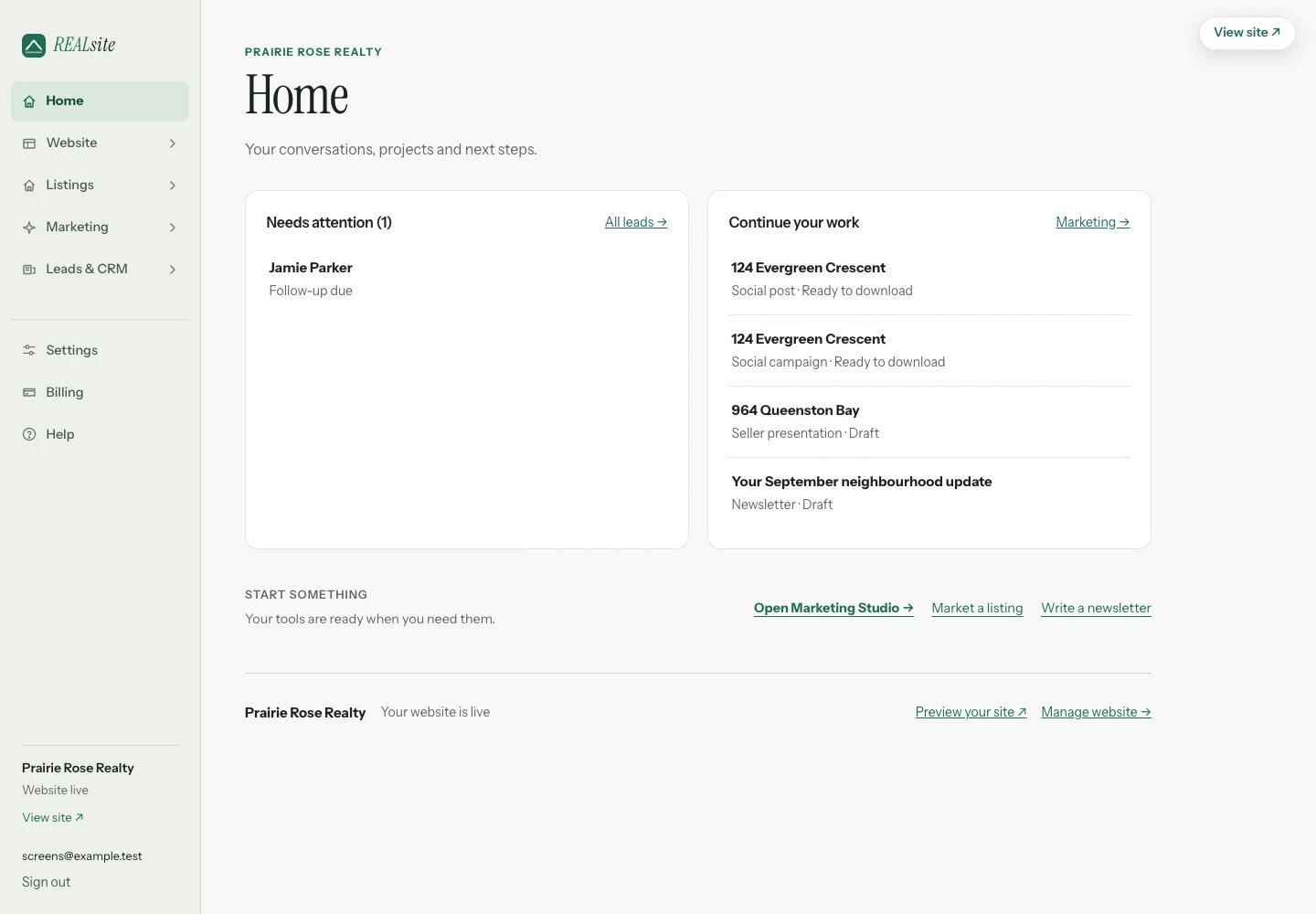 There are five main areas. The active area’s detailed tools appear directly beneath it in the sidebar:
* **Home** — pick up a draft or see what needs attention.
* **Website** — Design, Pages (with your area guides and blog as tabs), Team
and Domains. The overview shows your site traffic and, if you are switching,
the way to bring an existing site over.
* **Listings** — one page with tabs for property sites and open houses. Each
listing's action menu also opens its social campaign, open-house setup and
enquiries.
* **Marketing** — Tools for presentations, social campaigns, listing plans and
print materials, plus Newsletter and Lead generation.
* **Leads & CRM** — Leads, with an All contacts tab, and follow-up Automations.
Your media library, search settings and automatic reply wording live in
**Settings**.
**Settings**, **Billing** and **Help** stay available separately. On a phone,
open **Menu**, choose an area, then reopen the menu for its detailed tools.
The current tool stays highlighted. Existing bookmarked admin pages continue to work.
In **Marketing**, **Pick up where you left off** brings together recent saved
posts, campaigns, presentations, print projects, newsletters, articles, property websites and
lead-generation pages. Each opens its own editor; the materials stay separate.
Preparing an export does not post it anywhere.
## The first hour
Your address is `yourname.myrealsite.ca` from day one, and **View site**
in the admin shows you the real thing while visitors still see the
coming-soon page. Explore the pages and review the starter words and images
before publishing.
**Settings** holds your name, phone, tagline, headshot, and your site's
time zone (your morning digest and open-house follow-ups go by it).
**Design** is where you change how anything looks: pick a colour scheme,
rearrange sections. To try a theme, open the preview and use the theme
menu in the bar at the bottom; see [Themes](/docs/help/themes).
Headers show your site name until you upload a logo under **Settings** and
choose "Header shows my logo". A wide PNG with a transparent background
looks best. Every other picture your site uses lives under **Media**; see
[Media and your logo](/docs/help/media-and-logo).
Your MLS® listings sync automatically through your REALTOR.ca DDF® feed.
Start at **ddf.realtor.ca** (sign in with your REALTOR.ca account) and create a Member
Website Feed. CREA emails its username and password; paste them into **Your MLS® feed**
on the Listings page. There is nothing
extra to pay for the feed: DDF® comes with your CREA membership. See [Your listings](/docs/help/your-listings).
Import your old site as drafts, review what transferred, and check the
saved redirects before moving your domain. See [Bring my site](/docs/help/move-my-site).
When the site feels like yours, open **Settings**, choose **Live**, then
save. The status confirms when the saved visibility changes; selecting
Live alone does not publish the site. Publishing a page or its section
changes in Design does not change this website-wide setting.
## Your own domain
Connect a domain you already own any time — the connection and SSL are
included. New `.ca` and `.com` registrations and renewals through REALsite
Domains are charged separately. Until then your
`myrealsite.ca` address is available for visitors once you have saved **Live**
and your trial or subscription is active. When your domain moves,
everything (including any redirects from an imported site) follows it.
## Every feature included
An agent site is **$99 CAD/month**, a team site **$199 CAD/month** and a
brokerage site **\$249 CAD/month**. Every REALsite feature is included in each
plan. Each subscription covers its site; individual agent sites are separate
from a team or brokerage site. [See plans and billing details](https://realsite.ca/pricing).
***
Every REALsite feature is included: agent sites are $99 CAD/month, team sites
$199 CAD/month and brokerage sites $249 CAD/month. REALsite is by invitation
for now, and your first three months are $1.
[Request an invite](https://realsite.ca/request-invite).
This documentation is built and hosted on [Mintlify](https://mintlify.com), a developer documentation platform.
There are five main areas. The active area’s detailed tools appear directly beneath it in the sidebar:
* **Home** — pick up a draft or see what needs attention.
* **Website** — Design, Pages (with your area guides and blog as tabs), Team
and Domains. The overview shows your site traffic and, if you are switching,
the way to bring an existing site over.
* **Listings** — one page with tabs for property sites and open houses. Each
listing's action menu also opens its social campaign, open-house setup and
enquiries.
* **Marketing** — Tools for presentations, social campaigns, listing plans and
print materials, plus Newsletter and Lead generation.
* **Leads & CRM** — Leads, with an All contacts tab, and follow-up Automations.
Your media library, search settings and automatic reply wording live in
**Settings**.
**Settings**, **Billing** and **Help** stay available separately. On a phone,
open **Menu**, choose an area, then reopen the menu for its detailed tools.
The current tool stays highlighted. Existing bookmarked admin pages continue to work.
In **Marketing**, **Pick up where you left off** brings together recent saved
posts, campaigns, presentations, print projects, newsletters, articles, property websites and
lead-generation pages. Each opens its own editor; the materials stay separate.
Preparing an export does not post it anywhere.
## The first hour
Your address is `yourname.myrealsite.ca` from day one, and **View site**
in the admin shows you the real thing while visitors still see the
coming-soon page. Explore the pages and review the starter words and images
before publishing.
**Settings** holds your name, phone, tagline, headshot, and your site's
time zone (your morning digest and open-house follow-ups go by it).
**Design** is where you change how anything looks: pick a colour scheme,
rearrange sections. To try a theme, open the preview and use the theme
menu in the bar at the bottom; see [Themes](/docs/help/themes).
Headers show your site name until you upload a logo under **Settings** and
choose "Header shows my logo". A wide PNG with a transparent background
looks best. Every other picture your site uses lives under **Media**; see
[Media and your logo](/docs/help/media-and-logo).
Your MLS® listings sync automatically through your REALTOR.ca DDF® feed.
Start at **ddf.realtor.ca** (sign in with your REALTOR.ca account) and create a Member
Website Feed. CREA emails its username and password; paste them into **Your MLS® feed**
on the Listings page. There is nothing
extra to pay for the feed: DDF® comes with your CREA membership. See [Your listings](/docs/help/your-listings).
Import your old site as drafts, review what transferred, and check the
saved redirects before moving your domain. See [Bring my site](/docs/help/move-my-site).
When the site feels like yours, open **Settings**, choose **Live**, then
save. The status confirms when the saved visibility changes; selecting
Live alone does not publish the site. Publishing a page or its section
changes in Design does not change this website-wide setting.
## Your own domain
Connect a domain you already own any time — the connection and SSL are
included. New `.ca` and `.com` registrations and renewals through REALsite
Domains are charged separately. Until then your
`myrealsite.ca` address is available for visitors once you have saved **Live**
and your trial or subscription is active. When your domain moves,
everything (including any redirects from an imported site) follows it.
## Every feature included
An agent site is **$99 CAD/month**, a team site **$199 CAD/month** and a
brokerage site **\$249 CAD/month**. Every REALsite feature is included in each
plan. Each subscription covers its site; individual agent sites are separate
from a team or brokerage site. [See plans and billing details](https://realsite.ca/pricing).
***
Every REALsite feature is included: agent sites are $99 CAD/month, team sites
$199 CAD/month and brokerage sites $249 CAD/month. REALsite is by invitation
for now, and your first three months are $1.
[Request an invite](https://realsite.ca/request-invite).
This documentation is built and hosted on [Mintlify](https://mintlify.com), a developer documentation platform.